 Tech Dev Notes
Try asking
?Top climbers on the App Store this weekAsk
?Where does ChatGPT rank?Ask
?Which apps use RevenueCat?Ask
?Highest rated apps on Google PlayAsk
?Largest iOS appsAsk
?Most used SDKs on AndroidAsk

Rating
4.8 (12,351,058)
Price
Free
Version
v1.2026.307
Last updated
Updated Nov 10, 2026
Design system & build prompt
Design tokens, components, screens and features extracted from the public ChatGPT iOS app (build 1.2026.146) and its App Store screenshots, turned into a prompt you can paste into an AI coding tool.
Inspired-by kit. Use your own name, logo and assets. Colours from the app's asset catalog, layout notes estimated from screenshots.
Clean, modern iOS design with rounded corners, soft gradient backgrounds in pastel tones, generous white space, and vibrant accent colors for interactive elements. The interface feels approachable and premium with subtle shadows and smooth typography.
Design tokens
#0285ff#48aaffChatGPT/icon/accent
#ffffff#212121ChatGPT/bg/primary
#ffffff#303030ChatGPT/bg/elevated/primary
#0d0d0d#ffffffChatGPT/text/primary
#5d5d5d#cdcdcdChatGPT/text/secondary
#0d0d0d1a#ffffff26ChatGPT/border/default
#ff002a#ff8583ChatGPT/text/status/error
#ffffff 51%#eef3f8 8%#c3c0c2 8%#4b3d36 7%#a1928c 7%#fefefe 6%#f9fafa 6%#dee1e5 6%k-means on the phone screen area only (located per screenshot; marketing backgrounds and promo art excluded) (6 screenshots, light mode seen).
Design tokens
Type sample (estimated sizes)
Title 17pt. The quick brown fox jumps over the lazy dog.
Body 15pt. The quick brown fox jumps over the lazy dog.
Caption 13pt. The quick brown fox jumps over the lazy dog.
Clean sans-serif, system UI font. Message text uses standard readable size with bold for headings in responses. Prompts and labels are slightly smaller.
Fonts in the app bundle
No brand font bundled: the app uses the iOS system font (SF Pro). Use Inter on the web.
Design tokens
Corner radii (estimated)
Chat bubbles and input field use large corner radii for a soft, friendly appearance. Buttons are fully pill-shaped.
UI inventory
Navigation: single-screen chat with inline image display and bottom input bar. Conversations are presented in a scrollable chat view with user messages on the right in blue bubbles and assistant responses on the left in white/gray. Persistent bottom bar contains input field, attachment, voice, and send buttons. Top bar shows minimal status and menu icons.
Rounded rectangular message bubbles; user bubbles are light blue with right alignment, assistant bubbles are white/gray with left alignment and rounded image embeds when present. Text is left-aligned with selectable content.
Bottom toolbar with rounded pill-shaped text field labeled 'Ask ChatGPT', flanked by plus icon for attachments, microphone for voice, and blue circular send button with arrow. Includes copy/edit icons below assistant messages.
Embedded rectangular images within chat bubbles, showing generated scenes or uploaded photos with natural aspect ratios and subtle shadows.
Top status bar area with time, signal icons, and app controls including menu (hamburger), model selector icon, and more options (three dots).
Light blue rounded prompt suggestions appear above the input in some views, such as 'Imagine an epic alien landscape'.
Screen map

Demonstrates creating and iterating on AI-generated images through conversational prompts

Shows real-time voice mode interaction with transcribed messages and waveform indicator

Displays factual question answering with detailed text response and inline copy options

Interface for uploading or generating portrait photos and requesting style modifications
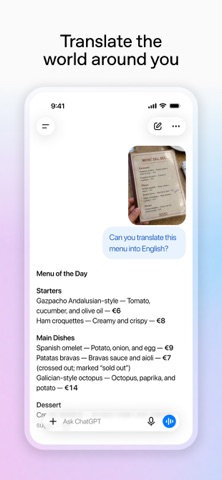
Photo upload for menu translation, showing extracted text alongside original image
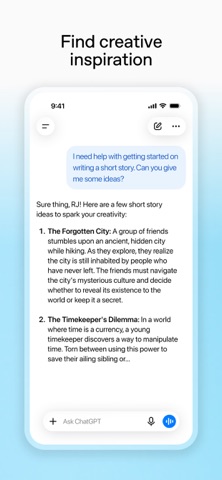
Idea generation for stories or projects with structured numbered suggestions
Core screen, not in the store screenshots
History of past conversations with search and new chat button
Core screen, not in the store screenshots
Main chat interface with message history, image support, and input controls
Core screen, not in the store screenshots
Full-screen or modal voice conversation with waveform and transcription
Core screen, not in the store screenshots
Prompt-based image creation and editing view integrated in chat
Core screen, not in the store screenshots
Account, model selection, history sync, and customization options
Core screen, not in the store screenshots
Initial welcome and feature introduction screens
Product
Generate and iterate on images from text prompts directly in chat
Real-time voice conversation with waveform visualization and transcription
Upload photos for OCR, translation, description or editing suggestions
Conversations sync across devices
Read and add photos for use in chats and image generation
Support for voice input and capturing photos
Web integration via Safari extension
Home screen widgets for quick access
From the app build
Permissions and why it asks
Third-party SDKs by category
For Cursor, Claude Code, v0
# Build an original app inspired by ChatGPT

You are a senior product engineer and designer. Build a new, original app whose look, feel and product scope are inspired by ChatGPT (Productivity, Utilities). Match the design language and UX patterns described below as closely as is reasonable, but it must be its own product.

## Branding rules (must follow)
- Use your own app name, logo, icon, illustrations and copy. Do not use the name "ChatGPT", its logo, mascots, screenshots, sounds or any trademarked or proprietary assets.
- Colours and type below are "inspired by" values. Adjust the brand accent so the result is clearly not confusable with ChatGPT.
- Do not copy proprietary fonts. Use the free alternatives named here.

## Target
Default to SwiftUI for iOS (the original is built with SwiftUI and UIKit, minimum iOS 17.0). If I ask for web or cross-platform, translate the same spec to Next.js + Tailwind or Expo (React Native) using the tokens below.

## Design tokens
Overall look: Clean, modern iOS design with rounded corners, soft gradient backgrounds in pastel tones, generous white space, and vibrant accent colors for interactive elements. The interface feels approachable and premium with subtle shadows and smooth typography.

Colour roles:
- Primary: light #0285ff, dark #48aaff (from the app's asset catalog)
- Background: light #ffffff, dark #212121 (from the app's asset catalog)
- Surface: light #ffffff, dark #303030 (from the app's asset catalog)
- Text: light #0d0d0d, dark #ffffff (from the app's asset catalog)
- Text secondary: light #5d5d5d, dark #cdcdcd (from the app's asset catalog)
- Border: light #0d0d0d1a, dark #ffffff26 (from the app's asset catalog)
- Error: light #ff002a, dark #ff8583 (from the app's asset catalog)

Typography:
- No brand font is bundled, so the original uses the iOS system font (SF Pro). Use the system font, or Inter on the web.
- Type style seen in screenshots: Clean sans-serif, system UI font, headings around weight 600.
- Estimated size scale (pt): caption 13, body 15, title 17.

Shape, spacing, icons and motion:
- Corner radii (estimated): sm 4px, md 12px, lg 20px, pill full pill.
- Chat bubbles and input field use large corner radii for a soft, friendly appearance. Buttons are fully pill-shaped.
- Spacing rhythm: 8px base unit, 16px screen margins.
- Generous padding around messages (approx 16-24px), tight vertical stacking of chat bubbles with 8px gaps, and 20px+ margins on input bar.
- Iconography: Filled and line icons with rounded shapes, consistent stroke weight, using blue accents for interactive elements like send button and microphone. Monochrome for most UI icons with color for status and actions.
- Elevation: Subtle drop shadows on chat bubbles, input bar, and image cards create depth against the white/gradient backgrounds. No heavy borders; depth primarily through layering and soft shadows.

## Navigation and components
Navigation pattern: single-screen chat with inline image display and bottom input bar. Conversations are presented in a scrollable chat view with user messages on the right in blue bubbles and assistant responses on the left in white/gray. Persistent bottom bar contains input field, attachment, voice, and send buttons. Top bar shows minimal status and menu icons.

Build these components:
- Chat Bubble: Rounded rectangular message bubbles; user bubbles are light blue with right alignment, assistant bubbles are white/gray with left alignment and rounded image embeds when present. Text is left-aligned with selectable content.
- Input Bar: Bottom toolbar with rounded pill-shaped text field labeled 'Ask ChatGPT', flanked by plus icon for attachments, microphone for voice, and blue circular send button with arrow. Includes copy/edit icons below assistant messages.
- Image Display: Embedded rectangular images within chat bubbles, showing generated scenes or uploaded photos with natural aspect ratios and subtle shadows.
- Header Bar: Top status bar area with time, signal icons, and app controls including menu (hamburger), model selector icon, and more options (three dots).
- Suggestion Card: Light blue rounded prompt suggestions appear above the input in some views, such as 'Imagine an epic alien landscape'.

## Screens
- Image Generation Chat: Demonstrates creating and iterating on AI-generated images through conversational prompts
- Voice Conversation: Shows real-time voice mode interaction with transcribed messages and waveform indicator
- Knowledge Query: Displays factual question answering with detailed text response and inline copy options
- Image Editing: Interface for uploading or generating portrait photos and requesting style modifications
- Translation & OCR: Photo upload for menu translation, showing extracted text alongside original image
- Creative Brainstorm: Idea generation for stories or projects with structured numbered suggestions
- Chat List (core screen, not shown in the store screenshots): History of past conversations with search and new chat button
- Conversation View (core screen, not shown in the store screenshots): Main chat interface with message history, image support, and input controls
- Voice Mode (core screen, not shown in the store screenshots): Full-screen or modal voice conversation with waveform and transcription
- Image Generation (core screen, not shown in the store screenshots): Prompt-based image creation and editing view integrated in chat
- Settings (core screen, not shown in the store screenshots): Account, model selection, history sync, and customization options
- Onboarding (core screen, not shown in the store screenshots): Initial welcome and feature introduction screens

## Key user flows
- Start New Chat: Open app to chat list or directly to new conversation -> Type or speak prompt in bottom input -> Send message and receive streaming response -> Continue conversation or regenerate
- Image Interaction: Attach photo or describe image generation prompt -> View generated or analyzed image in chat bubble -> Follow up with edit or describe instructions -> Save or share resulting image
- Voice Mode: Tap microphone or soundwave icon -> Speak query while waveform animates -> Receive spoken and transcribed reply -> Continue real-time dialogue or exit
- Query & Iterate: Ask factual, creative or advisory question -> Review detailed response with copy/edit options -> Refine with follow-up messages -> Switch between text, voice, or image modes

## Feature set (as far as public data shows)
- Image Generation: Generate and iterate on images from text prompts directly in chat
- Voice Mode: Real-time voice conversation with waveform visualization and transcription
- Image Upload & Analysis: Upload photos for OCR, translation, description or editing suggestions
- Chat History Sync: Conversations sync across devices
- Photo Library Access: Read and add photos for use in chats and image generation
- Microphone & Camera: Support for voice input and capturing photos
- Safari Extension: Web integration via Safari extension
- Widgets: Home screen widgets for quick access

## Platform integrations
- App extensions in the original: Safari.web-extension, widgetkit-extension, broadcast-services-upload, usernotifications.service, share-services. Consider equivalents (widgets, share sheet, notifications).
- Siri / Shortcuts intents in the original: Start chat in project, Open Codex, Allow, Ask ChatGPT about an image, Voice Mode, View, Start conversation with ChatGPT, Ask ChatGPT, Ask ChatGPT about an image with a prompt.
- It registers a custom URL scheme for deep links; register your own (for example yourapp://).
- Permissions it asks for: Camera, Face ID, HealthKit (read), HealthKit (write), Location (when in use), Microphone, Photo Library (add), Photo Library (read). Only request what your features need, with a clear purpose string.
- Capabilities: App Groups, Apple Pay, Associated Domains (Universal Links), Background Audio, Background Push, CarPlay, Communication Notifications, HealthKit, Keychain Sharing, Push Notifications (APNs), Sign in with Apple.
- Localised into 64 languages; build with String Catalogs from day one.

## Tech stack hints (detected in the public build)
- Languages: C/C++, Metal (shaders), Objective-C, Swift
- SDKs, networking: APIClient, APICore
- SDKs, auth: Auth0
- SDKs, messaging: Conversations, ConversationsCore
- SDKs, crash_perf: DatadogCore
- SDKs, rendering: Highlight.js, Highlightr, KaTeX, Kingfisher, Lottie, OAIMarkdown
- SDKs, telephony: PhoneNumberKit
- SDKs, analytics: Segment
- SDKs, payments: LinkKit, Stripe
- SDKs, voice: LiveKit
Pick equivalent or simpler open-source options; you do not need the same vendors.

## Acceptance checklist
- Light and dark mode both implemented with the colour roles above.
- Every screen listed above exists with realistic placeholder data and your own branding.
- Components are reusable, accessible (Dynamic Type, VoiceOver labels, 4.5:1 text contrast) and use the token names, not hard-coded values.
- No ChatGPT names, logos, icons, screenshots or proprietary fonts anywhere in the code or assets.

Source data: https://techdevnotes.com/apps/ios/chatgpt/6448311069/design-system (Tech Dev Notes, generated 2026-10-25 from iOS build 1.2026.146 and the App Store listing).
{
  "$description": "Design tokens inspired by ChatGPT (iOS 1.2026.146). Generated by Tech Dev Notes from the public app build and store screenshots. Use your own brand name, logo and assets; do not copy trademarks.",
  "$source": "https://techdevnotes.com/apps/ios/chatgpt/6448311069/design-system",
  "$generatedAt": "2026-10-25T16:51:23Z",
  "color": {
    "light": {
      "primary": {
        "$type": "color",
        "$value": "#0285ff",
        "$description": "source token: ChatGPT/icon/accent"
      },
      "background": {
        "$type": "color",
        "$value": "#ffffff",
        "$description": "source token: ChatGPT/bg/primary"
      },
      "surface": {
        "$type": "color",
        "$value": "#ffffff",
        "$description": "source token: ChatGPT/bg/elevated/primary"
      },
      "text": {
        "$type": "color",
        "$value": "#0d0d0d",
        "$description": "source token: ChatGPT/text/primary"
      },
      "textSecondary": {
        "$type": "color",
        "$value": "#5d5d5d",
        "$description": "source token: ChatGPT/text/secondary"
      },
      "border": {
        "$type": "color",
        "$value": "#0d0d0d1a",
        "$description": "source token: ChatGPT/border/default"
      },
      "error": {
        "$type": "color",
        "$value": "#ff002a",
        "$description": "source token: ChatGPT/text/status/error"
      }
    },
    "dark": {
      "primary": {
        "$type": "color",
        "$value": "#48aaff",
        "$description": "source token: ChatGPT/icon/accent"
      },
      "background": {
        "$type": "color",
        "$value": "#212121",
        "$description": "source token: ChatGPT/bg/primary"
      },
      "surface": {
        "$type": "color",
        "$value": "#303030",
        "$description": "source token: ChatGPT/bg/elevated/primary"
      },
      "text": {
        "$type": "color",
        "$value": "#ffffff",
        "$description": "source token: ChatGPT/text/primary"
      },
      "textSecondary": {
        "$type": "color",
        "$value": "#cdcdcd",
        "$description": "source token: ChatGPT/text/secondary"
      },
      "border": {
        "$type": "color",
        "$value": "#ffffff26",
        "$description": "source token: ChatGPT/border/default"
      },
      "error": {
        "$type": "color",
        "$value": "#ff8583",
        "$description": "source token: ChatGPT/text/status/error"
      }
    }
  },
  "namedColorsSample": {
    "ChatGPT/bg/elevated/primary": {
      "light": "#ffffff",
      "dark": "#303030"
    },
    "ChatGPT/bg/elevated/secondary": {
      "light": "#f3f3f3",
      "dark": "#212121"
    },
    "ChatGPT/bg/primary": {
      "light": "#ffffff",
      "dark": "#212121"
    },
    "ChatGPT/bg/primary-inverse": {
      "light": "#f9f9f9",
      "dark": "#131313"
    },
    "ChatGPT/bg/scrim": {
      "light": "#e3e3e380",
      "dark": "#0d0d0d80"
    },
    "ChatGPT/bg/secondary": {
      "light": "#e8e8e8",
      "dark": "#303030"
    },
    "ChatGPT/bg/status/error": {
      "light": "#fff0f0",
      "dark": "#4d100e"
    },
    "ChatGPT/bg/status/success": {
      "light": "#d9f4e4",
      "dark": "#004f1f"
    },
    "ChatGPT/bg/status/warning": {
      "light": "#fff5f0",
      "dark": "#4a2206"
    },
    "ChatGPT/bg/tertiary": {
      "light": "#f3f3f3",
      "dark": "#414141"
    },
    "ChatGPT/border/default": {
      "light": "#0d0d0d1a",
      "dark": "#ffffff26"
    },
    "ChatGPT/border/heavy": {
      "light": "#0d0d0d26",
      "dark": "#ffffff33"
    },
    "ChatGPT/border/light": {
      "light": "#0d0d0d0d",
      "dark": "#ffffff0d"
    },
    "ChatGPT/border/status/error": {
      "light": "#ffe1e0",
      "dark": "#4d100e"
    },
    "ChatGPT/border/status/success": {
      "light": "#004f1f",
      "dark": "#edfaf2"
    },
    "ChatGPT/border/status/warning": {
      "light": "#ffe7d9",
      "dark": "#4a2206"
    },
    "ChatGPT/component/BadgeLabel/bg": {
      "light": "#e5f3ff",
      "dark": "#013566"
    },
    "ChatGPT/component/Sidebar/bg": {
      "light": "#f9f9f9",
      "dark": "#181818"
    },
    "ChatGPT/icon/accent": {
      "light": "#0285ff",
      "dark": "#48aaff"
    },
    "ChatGPT/icon/inverted": {
      "light": "#ffffff",
      "dark": "#0d0d0d"
    },
    "ChatGPT/icon/primary": {
      "light": "#0d0d0d",
      "dark": "#ffffff"
    },
    "ChatGPT/icon/secondary": {
      "light": "#5d5d5d",
      "dark": "#cdcdcd"
    },
    "ChatGPT/icon/status/error": {
      "light": "#ff002a",
      "dark": "#ff8583"
    },
    "ChatGPT/icon/status/success": {
      "light": "#004f1f",
      "dark": "#edfaf2"
    },
    "ChatGPT/icon/status/warning": {
      "light": "#e25507",
      "dark": "#ff9e6c"
    },
    "ChatGPT/icon/tertiary": {
      "light": "#8f8f8f",
      "dark": "#afafaf"
    },
    "ChatGPT/interactive/bg/accent/default": {
      "light": "#ffffff00",
      "dark": "#0d0d0d00"
    },
    "ChatGPT/interactive/bg/accent/hover": {
      "light": "#0285ff0a",
      "dark": "#99ceff26"
    },
    "ChatGPT/interactive/bg/accent/inactive": {
      "light": "#ffffff00",
      "dark": "#0d0d0d00"
    },
    "ChatGPT/interactive/bg/accent/press": {
      "light": "#0285ff17",
      "dark": "#99ceff33"
    },
    "ChatGPT/interactive/bg/accent/secondary/inactive": {
      "light": "#ffffff00",
      "dark": "#0d0d0d00"
    },
    "ChatGPT/interactive/bg/danger/secondary/default": {
      "light": "#0d0d0d00",
      "dark": "#ffffff00"
    },
    "ChatGPT/interactive/bg/danger/secondary/hover": {
      "light": "#0d0d0d00",
      "dark": "#ffffff00"
    },
    "ChatGPT/interactive/bg/danger/secondary/inactive": {
      "light": "#0d0d0d00",
      "dark": "#ffffff00"
    },
    "ChatGPT/interactive/bg/danger/secondary/press": {
      "light": "#0d0d0d00",
      "dark": "#ffffff00"
    },
    "ChatGPT/interactive/bg/primary/default": {
      "light": "#0d0d0d",
      "dark": "#ffffff"
    },
    "ChatGPT/interactive/bg/primary/hover": {
      "light": "#0d0d0dcc",
      "dark": "#ffffffcc"
    },
    "ChatGPT/interactive/bg/primary/inactive": {
      "light": "#0d0d0d",
      "dark": "#ffffff"
    },
    "ChatGPT/interactive/bg/primary/press": {
      "light": "#0d0d0de6",
      "dark": "#ffffffe6"
    },
    "ChatGPT/interactive/bg/primary/selected": {
      "light": "#0d0d0d",
      "dark": "#ffffff"
    },
    "ChatGPT/interactive/bg/secondary/default": {
      "light": "#0d0d0d00",
      "dark": "#ffffff00"
    },
    "ChatGPT/interactive/bg/secondary/hover": {
      "light": "#0d0d0d05",
      "dark": "#ffffff1a"
    },
    "ChatGPT/interactive/bg/secondary/inactive": {
      "light": "#0d0d0d00",
      "dark": "#ffffff00"
    },
    "ChatGPT/interactive/bg/secondary/press": {
      "light": "#0d0d0d0d",
      "dark": "#ffffff0d"
    },
    "ChatGPT/interactive/bg/secondary/selected": {
      "light": "#0d0d0d0d",
      "dark": "#ffffff1a"
    },
    "ChatGPT/interactive/bg/tertiary/default": {
      "light": "#ffffff",
      "dark": "#212121"
    },
    "ChatGPT/interactive/bg/tertiary/hover": {
      "light": "#f9f9f9",
      "dark": "#181818"
    },
    "ChatGPT/interactive/bg/tertiary/inactive": {
      "light": "#ffffff",
      "dark": "#212121"
    },
    "ChatGPT/interactive/bg/tertiary/press": {
      "light": "#f3f3f3",
      "dark": "#0d0d0d"
    },
    "ChatGPT/interactive/bg/tertiary/selected": {
      "light": "#ffffff",
      "dark": "#212121"
    },
    "ChatGPT/interactive/border/danger/secondary/default": {
      "light": "#ff002a",
      "dark": "#fa423e"
    },
    "ChatGPT/interactive/border/danger/secondary/hover": {
      "light": "#fa423e",
      "dark": "#ff6764"
    },
    "ChatGPT/interactive/border/danger/secondary/inactive": {
      "light": "#ff002a",
      "dark": "#fa423e"
    },
    "ChatGPT/interactive/border/danger/secondary/press": {
      "light": "#ba2623",
      "dark": "#ff002a"
    },
    "ChatGPT/interactive/border/focus": {
      "light": "#0d0d0d",
      "dark": "#ffffff"
    },
    "ChatGPT/interactive/border/secondary/default": {
      "light": "#0d0d0d1a",
      "dark": "#ffffff26"
    },
    "ChatGPT/interactive/border/secondary/hover": {
      "light": "#0d0d0d0d",
      "dark": "#ffffff26"
    },
    "ChatGPT/interactive/border/secondary/inactive": {
      "light": "#0d0d0d1a",
      "dark": "#ffffff1a"
    },
    "ChatGPT/interactive/border/secondary/press": {
      "light": "#0d0d0d0d",
      "dark": "#ffffff33"
    },
    "ChatGPT/interactive/border/tertiary/default": {
      "light": "#0d0d0d1a",
      "dark": "#ffffff1a"
    },
    "ChatGPT/interactive/border/tertiary/hover": {
      "light": "#0d0d0d1a",
      "dark": "#ffffff26"
    },
    "ChatGPT/interactive/border/tertiary/inactive": {
      "light": "#0d0d0d1a",
      "dark": "#ffffff1a"
    },
    "ChatGPT/interactive/border/tertiary/press": {
      "light": "#0d0d0d0d",
      "dark": "#ffffff1a"
    },
    "ChatGPT/interactive/icon/accent/default": {
      "light": "#0285ff",
      "dark": "#48aaff"
    },
    "ChatGPT/interactive/icon/accent/hover": {
      "light": "#0285ff",
      "dark": "#48aaff"
    },
    "ChatGPT/interactive/icon/accent/inactive": {
      "light": "#0285ff",
      "dark": "#48aaff"
    },
    "ChatGPT/interactive/icon/accent/press": {
      "light": "#0285ff",
      "dark": "#48aaff"
    },
    "ChatGPT/interactive/icon/accent/selected": {
      "light": "#0285ff",
      "dark": "#48aaff"
    },
    "ChatGPT/interactive/icon/danger/secondary/default": {
      "light": "#ff002a",
      "dark": "#fa423e"
    },
    "ChatGPT/interactive/icon/danger/secondary/hover": {
      "light": "#fa423e",
      "dark": "#ff6764"
    },
    "ChatGPT/interactive/icon/danger/secondary/inactive": {
      "light": "#ff002a",
      "dark": "#fa423e"
    },
    "ChatGPT/interactive/icon/danger/secondary/press": {
      "light": "#ba2623",
      "dark": "#ff002a"
    },
    "ChatGPT/interactive/icon/primary/default": {
      "light": "#ffffff",
      "dark": "#0d0d0d"
    },
    "ChatGPT/interactive/icon/primary/hover": {
      "light": "#ffffff",
      "dark": "#0d0d0d"
    },
    "ChatGPT/interactive/icon/primary/inactive": {
      "light": "#ffffff",
      "dark": "#0d0d0d"
    },
    "ChatGPT/interactive/icon/primary/press": {
      "light": "#ffffff",
      "dark": "#0d0d0d"
    },
    "ChatGPT/interactive/icon/primary/selected": {
      "light": "#ffffff",
      "dark": "#0d0d0d"
    },
    "ChatGPT/interactive/icon/secondary/default": {
      "light": "#0d0d0d",
      "dark": "#ffffff"
    },
    "ChatGPT/interactive/icon/secondary/hover": {
      "light": "#0d0d0de6",
      "dark": "#ffffffe6"
    },
    "ChatGPT/interactive/icon/secondary/inactive": {
      "light": "#0d0d0d",
      "dark": "#f3f3f3"
    }
  },
  "screenshotPalette": [
    {
      "hex": "#ffffff",
      "share": 0.508
    },
    {
      "hex": "#eef3f8",
      "share": 0.082
    },
    {
      "hex": "#c3c0c2",
      "share": 0.077
    },
    {
      "hex": "#4b3d36",
      "share": 0.074
    },
    {
      "hex": "#a1928c",
      "share": 0.07
    },
    {
      "hex": "#fefefe",
      "share": 0.064
    },
    {
      "hex": "#f9fafa",
      "share": 0.064
    },
    {
      "hex": "#dee1e5",
      "share": 0.062
    }
  ],
  "font": {
    "family": {
      "sans": {
        "$type": "fontFamily",
        "$value": "-apple-system, \"SF Pro Text\", \"Inter\", system-ui, sans-serif"
      }
    },
    "size": {
      "caption": {
        "$type": "dimension",
        "$value": "13px",
        "$description": "estimated from screenshots"
      },
      "body": {
        "$type": "dimension",
        "$value": "15px",
        "$description": "estimated from screenshots"
      },
      "title": {
        "$type": "dimension",
        "$value": "17px",
        "$description": "estimated from screenshots"
      }
    }
  },
  "radius": {
    "sm": {
      "$type": "dimension",
      "$value": "4px",
      "$description": "estimated from screenshots"
    },
    "md": {
      "$type": "dimension",
      "$value": "12px",
      "$description": "estimated from screenshots"
    },
    "lg": {
      "$type": "dimension",
      "$value": "20px",
      "$description": "estimated from screenshots"
    },
    "pill": {
      "$type": "dimension",
      "$value": "9999px",
      "$description": "estimated from screenshots"
    }
  },
  "spacing": {
    "base": {
      "$type": "dimension",
      "$value": "8px",
      "$description": "estimated from screenshots"
    },
    "screenMargin": {
      "$type": "dimension",
      "$value": "16px"
    }
  }
}@theme {
--font-sans: -apple-system, "SF Pro Text", "Inter", system-ui, sans-serif;
--radius-sm: 4px;
--radius-md: 12px;
--radius-lg: 20px;
--radius-pill: 9999px;
--spacing: 4px;
}
:root {
--color-primary: #0285ff;
--color-background: #ffffff;
--color-surface: #ffffff;
--color-text: #0d0d0d;
--color-text-secondary: #5d5d5d;
--color-border: #0d0d0d1a;
--color-error: #ff002a;
}
@media (prefers-color-scheme: dark) {
:root {
--color-primary: #48aaff;
--color-background: #212121;
--color-surface: #303030;
--color-text: #ffffff;
--color-text-secondary: #cdcdcd;
--color-border: #ffffff26;
--color-error: #ff8583;
}
}How this kit was made
Colour roles and named colours come from the asset catalogs inside the public ChatGPT iOS build 1.2026.146, fonts from the font files it bundles, intents, extensions, URL schemes and permissions from its Info.plist and metadata and SDKs from Tech Dev Notes' tech stack analysis. Missing roles are filled from a k-means palette of the App Store screenshots. Components, screens, flows, sizes and radii are a vision model's reading of the 8 store screenshots, so treat them as estimates. Generated 2026-10-25. ChatGPT is a trademark of OpenAI OpCo, LLC; Tech Dev Notes is not affiliated.